Real boards
Every game uses actual mine placement, number clues, flags, chording, win checks, and first-click safety instead of a static mockup.
 Minesweeper.us.com
 Fast logic puzzle, no account needed
Minesweeper is ready to play here with first-click safety, no-guess boards, daily seeds, local best times, and controls that work on a mouse, keyboard, or phone.

Start with the default no-guess beginner board, switch to classic random boards, or open a daily challenge that uses the same seed for every player today.
Every game uses actual mine placement, number clues, flags, chording, win checks, and first-click safety instead of a static mockup.
The generator tests boards with deterministic solver rules so beginner and many larger boards can be solved by logic instead of forced coin flips.
The layout puts the board, counters, controls, and useful links above the fold on desktop while staying clean and thumb-friendly on mobile.
Preferences, themes, seeds, and best times stay in localStorage. No account, analytics script, or server profile is required to play.
Minesweeper is a deduction game played on a hidden grid. Some cells contain mines, and every safe cell either opens into empty space or shows a number. That number tells you how many mines touch the cell horizontally, vertically, or diagonally. The goal is to open every safe cell while marking the dangerous ones with flags. The rules are short, but the board creates a steady stream of small logic problems.
A strong board feels fair because each number gives useful information. A 1 touching one hidden cell means that hidden cell must be a mine. A 2 touching two flagged cells means the remaining neighbors are safe. When several numbers overlap, you compare their hidden neighbor groups and remove the known parts. This is where the game becomes more than memory or speed; it becomes careful local reasoning.
Classic random boards can produce positions where two cells are equally possible and no visible clue can separate them. Many players enjoy that tension, but it can feel harsh when a perfect game ends on a forced 50/50. The no-guess option on this site tries to avoid that outcome by accepting boards that a solver can progress through with standard deterministic rules.
The online version also adds conveniences that old desktop versions did not always include. You can use a daily seed, copy a board seed, switch themes, play from a phone, keep local best times, ask for an educational hint, and restart instantly without downloading software.
A good way to improve is to review why each flag was placed. If the answer is only “it looked likely,” leave the cell alone and search for another number that gives proof. This habit keeps the board explainable and makes mistakes easier to find after a loss.
Speed comes later. Accurate play starts with stable reasoning, clean mouse or touch control, and a board layout that does not shift while you think. Once those basics feel natural, chording and pattern recognition reduce time without turning the puzzle into random clicking.
For training, try replaying the same seed after a loss. The repeated board shows whether the mistake came from a missed number, an early flag, or a rushed chord. That feedback loop is more useful than rerolling endlessly.
Choose a cell that gives you room to read the board. The first click here is safe, and the generator tries to open a useful area instead of punishing the opening move.
A number counts mines in the eight neighboring cells. If a 1 touches exactly one closed neighbor, that neighbor is a mine. If a 3 already touches three flags, every other closed neighbor is safe.
Flags protect cells you believe contain mines and help chording work correctly. Avoid guessing flags early; a wrong flag can make later logic look false.
When a revealed number has the correct number of adjacent flags, chording opens the remaining closed neighbors. This speeds up clean positions and exposes mistakes quickly.
Near the end, combine local clues with the remaining mine counter. If all remaining mines must fit into one group, cells outside that group can often be opened safely.
| Action | Desktop | Mobile |
|---|---|---|
| Open a cell | Left click, Enter, or Space on a focused cell | Tap in open mode |
| Flag a mine | Right click or press F to toggle flag mode | Long press or tap in flag mode |
| Chord a number | Middle click, double click, or use the chord button | Tap a revealed number or use one-hand controls |
| New board | N key or New game button | New game button below the board |
| Hint | H key or Hint button | Hint button with highlighted cells |
| Daily board | D key or Daily Challenge button | Daily Challenge button |
| Mode | Size | Mines | Best for |
|---|---|---|---|
| Beginner | 9 × 9 | 10 | Learning patterns, mobile sessions, and fast no-guess boards |
| Intermediate | 16 × 16 | 40 | Balanced games where board reading matters more than raw speed |
| Expert | 30 × 16 | 99 | Large desktop boards, advanced pattern recognition, and timer runs |
| Custom | 6–40 × 6–24 | Safe limit | Personal board sizes, training patterns, and accessibility preferences |
| No-Guess | Any preset | Adjusted by mode | Logic-first play where progress should come from clues |
| Daily Challenge | Preset seed | By difficulty | Comparing one shared board with friends without a backend |
Good strategy starts with small, repeatable observations. You do not need to memorize every possible board. You need to keep the mine count honest, compare neighboring clues, and avoid placing flags before the evidence is strong.
| Pattern | How it helps |
|---|---|
| Single-cell completion | If a number touches exactly as many hidden cells as mines still needed, every hidden cell in that group is a mine. This is the safest first rule to practice because it creates confirmed flags. |
| Satisfied number opening | If a number already touches the required flags, all other hidden neighbors are safe. This rule often opens wide empty regions after one correct flag placement. |
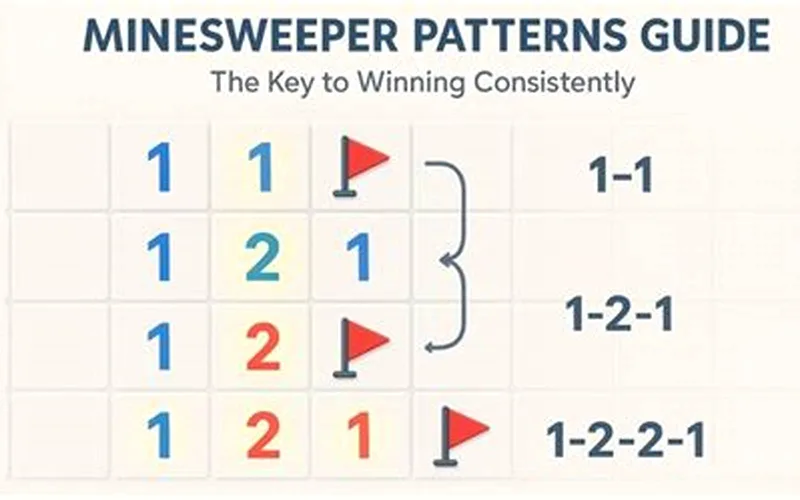
| 1-2 edge pattern | A 1 next to a 2 along an edge often points to a mine outside the 1 and a safe cell on the far side. Check the exact neighbor groups before applying it. |
| Subset reasoning | When all hidden cells of one clue are contained inside another clue group, subtract the smaller group from the larger group. The remainder may become all mines or all safe cells. |
| Mine counter pressure | The global mine counter matters near the end. If every unflagged mine must fit into a known region, hidden cells outside that region can be safe even when local numbers look incomplete. |
| Delay uncertain flags | A tempting guess can poison the whole board. Mark mental possibilities, use hints if you are training, and place flags only when a number pattern proves them. |
No-guess mode does not mean every move is obvious. It means the board should contain a logical path from the first safe opening to the final cell. The generator creates a candidate board, reveals the first-click state, then runs deterministic solver rules. If the solver cannot prove progress, the board is rejected and another board is tried.
The solver checks basic number satisfaction, mine completion, overlapping clue subsets, and endgame mine-count situations. These are the same ideas a careful human player uses. The system is intentionally conservative: if it cannot prove the board, it does not pretend the position is solved.
On very dense custom boards, a perfect no-guess proof can take too long in a browser. To keep the interface responsive, generation uses attempt limits and safer density fallback. The result is a practical no-guess mode that favors fair logic without freezing the page.
The daily challenge uses a deterministic seed built from the date and selected difficulty. Everyone who opens the same language page on the same date gets the same board settings and seed, so results can be shared without a server account.
Daily boards are useful for measuring improvement because you cannot reroll the puzzle until it looks friendly. You can still practice with normal boards, then return to the daily challenge and compare your time, mistakes, and flag discipline.
The share button creates plain text with the mode, difficulty, time, and site name. If your browser supports the Web Share API, it opens the native share sheet; otherwise the text is copied to the clipboard.
Mobile play needs controls that avoid accidental flags and accidental browser menus. This board supports tap to open, long press to flag, a visible flag-mode toggle, and a one-hand mode that places important controls below the board.
The board keeps stable square cells and can fit smaller screens without horizontal page overflow. Expert boards are naturally wider, so the play area allows controlled scrolling while the rest of the page remains readable.
High contrast and soft themes help different lighting conditions. Focus states, real buttons, ARIA labels, and reduced-motion support keep the game usable beyond a narrow desktop setup.

The no-guess mode is exactly what I wanted. I can finally lose because of my logic, not because of a random 50/50.
Fast, clean, and the mobile controls are much better than most puzzle sites I have tried.
Daily challenges and local best times make it easy to come back for a quick puzzle every day.
Yes. The game runs in your browser for free, with no account, payment, or download required.
No-guess mode tries to generate boards that can be solved by logic from the first safe click, without forced 50/50 guesses.
Classic random boards cannot guarantee that. No-guess mode rejects boards the built-in solver cannot prove with deterministic rules.
Long press a closed cell, or turn on flag mode and tap the cell you want to mark.
Chording opens the remaining closed neighbors around a revealed number when the correct number of adjacent flags is already placed.
Start with confirmed 1 patterns, flag only proven mines, and open cells around numbers that already have the required flags.
Yes. The daily challenge uses a deterministic date seed and difficulty setting, so the same day produces the same board.
After the page loads, the game logic runs locally. Full offline support depends on your browser cache and deployment settings.
Ready for another board? Start a fresh game, try a no-guess seed, or open today’s daily challenge for focused logic practice.
Play now